The trade you didn’t agree to
When you sign up for a productivity app, the pitch is simple: we’ll help you get organized. What’s left unsaid is the exchange you’re making. In return for a nicer interface, you’re handing over your tasks, your notes, your calendar, your plans — essentially, the operating system of your daily life — to a company’s servers.
This might seem fine. You trust the company. The app works well. But you’ve entered into a relationship with terms you probably haven’t considered. What happens when the company changes its pricing? When it gets acquired? When it shuts down? When it decides to train an AI model on your data?
You’ve given away control of your most personal information in exchange for convenience. And the moment you want to leave, you discover just how tight the grip is.
The lock-in problem
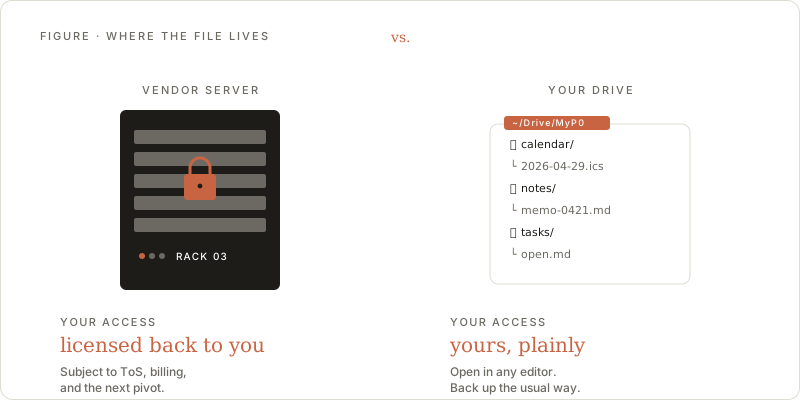
Every productivity app stores your data in its own proprietary format, on its own servers, behind its own API. This isn’t a technical necessity — it’s a business strategy. The more data you put in, the harder it becomes to leave.
Try exporting your data from most productivity tools. You’ll get a JSON dump or a zip file of markdown that loses all the structure, relationships, and metadata that made the data useful in the first place. Your carefully organized project hierarchy becomes a flat folder of disconnected files. Your task dependencies vanish. Your calendar integrations break.
This is by design. The switching cost is the moat. Your data is the product’s leverage over you, not its service to you.
What you actually lose
The lock-in problem is obvious. The subtler costs are worse.
You lose longevity. Productivity apps have a half-life. Wunderlist, Google Inbox, Sunrise Calendar, Astrid, Any.do’s original incarnation — the graveyard is large. Every shutdown means migrating your entire system to something new, losing data and workflow in the transition. Your productivity practice shouldn’t depend on whether a startup can make payroll.
You lose privacy. Your task list reveals what you’re working on, what you’re worried about, what you’re planning. Your notes contain meeting details, personal reflections, and half-formed ideas. This is intimate information sitting on servers you don’t control, subject to data breaches, employee access, government requests, and terms of service you didn’t read.
You lose interoperability. When your data is locked in one app’s format, you can’t build on top of it. You can’t write a script to analyze your productivity patterns, connect your tasks to a different calendar, or build a custom dashboard. Your own data becomes inaccessible to you except through the one interface the vendor provides.
You lose permanence. Your notes from five years ago should be as accessible as the ones you wrote today. But if the app that stored them no longer exists, or has changed its format three times, or has moved to a pricing tier you don’t want to pay for, those notes are effectively gone.
The alternative: infrastructure you already own
Here’s a different approach. Instead of building yet another proprietary backend that holds your data hostage, use infrastructure that already exists, that you already control, and that will outlast any single application.
Google Workspace gives you a calendar, a task manager, and a file system. These aren’t trendy — they’re infrastructure. Google Calendar has existed since 2006. Google Drive since 2012. They support open standards and well-documented APIs. Your data lives in your Google account, and you can access it from any tool, export it at any time, or switch to a different frontend whenever you want.
The app becomes a lens, not a vault. It reads your data, presents it in a useful way, and writes changes back. If the app disappears tomorrow, your data is exactly where it was — in your Google account, fully intact, accessible through Google’s own interfaces or any other tool that speaks the same APIs.
What this means in practice
When your productivity app is a stateless frontend over your own data, several things change.
No migration. You never need to export and import. Your data doesn’t move. Only the interface changes. If you find a better app, you point it at the same Google account and keep going.
No single point of failure. If the app goes offline, you still have Google Calendar, Google Tasks, and Google Drive. Your system degrades gracefully to the tools you already have, rather than collapsing entirely.
No data silos. Because your data lives in standard formats behind public APIs, you can access it from multiple tools simultaneously. Use MyP0 for your daily workflow and a calendar app for quick scheduling. Write a script that analyzes your task completion rate. Build an integration with your team’s tools. It’s your data — use it however you want.
No trust required. The app never stores your data. It never even sees your data on its own servers. Authentication happens directly between your browser and Google using OAuth. The app is just static files running in your browser. There is no backend to breach because there is no backend.
The objection
The obvious counter-argument: aren’t you just moving the trust from one company to another? You’re still trusting Google.
Yes. But there’s a qualitative difference. Google is infrastructure — the same way you trust your electricity provider or your bank. Google’s business model doesn’t depend on locking you into a specific productivity app. Your Google account is portable: you can download all your data through Google Takeout at any time, in standard formats. And Google’s services are stable enough that building on them is a reasonable bet.
The alternative — trusting a venture-funded startup with your life’s organizational data — is a meaningfully worse proposition. Startups pivot, get acquired, run out of money, or simply lose interest. Google Calendar will still be there.
More importantly, this architecture doesn’t require Google specifically. The same principle works with any well-established platform that offers stable APIs and data portability. Google is a good choice today, but the point is the pattern: your data belongs in infrastructure you control, not in an application’s proprietary silo.
The principle
Your productivity data is a record of how you spend your time and attention — arguably the most personal data you generate. It deserves the same care you’d give to your financial records or your personal documents. You wouldn’t store your tax returns exclusively inside a startup’s app with no export option. Your tasks and notes deserve the same respect.
The best productivity tool is one that makes itself replaceable. It should add value through its interface and its integrations, not through its grip on your data. When the tool and the data are separate, you’re free to choose the best tool for the job today without mortgaging your data to do it.
That’s the bet MyP0 makes: the app is disposable, your data is not.