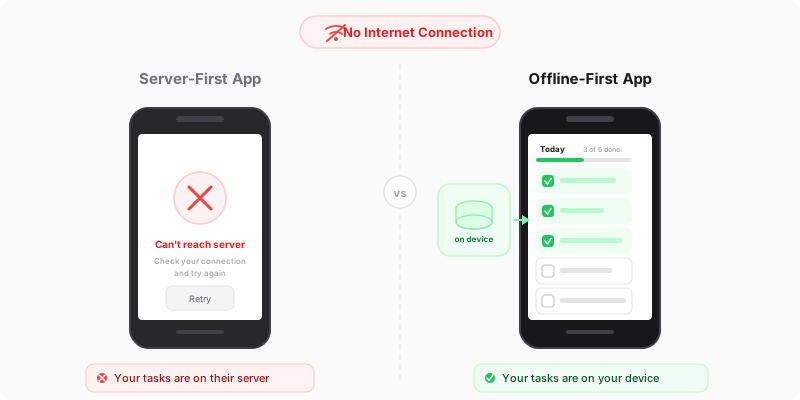
The wifi went out and so did my system
A few months back I was on a train — one of those routes where the signal drops every ten minutes — trying to plan my week. I opened my productivity app, tapped on my task list, and got a spinner. Then a timeout. Then a sad little error message telling me I was offline, as if I didn’t already know that.
My entire system was useless. Not because the data was gone — it was right there on Google’s servers, perfectly intact. But the app I was using needed a constant connection just to show me my own tasks. Tasks I had created. On my own phone. With my own thumbs.
That was the moment I realized most productivity tools treat offline mode as an edge case. Its not. Its how a lot of us actually work.
The always-online assumption
Most productivity apps are built with a pretty bold assumption: that you’ll always have a fast, reliable internet connection. This made sense when everyone worked at a desk with ethernet. It makes alot less sense now.
People work on trains, on planes, in coffee shops with terrible wifi, in buildings with dead zones, and honestly sometimes just in their own apartments where the router is being flaky. International travel? Good luck with your roaming data costs. Rural areas? Forget about it.
But even if you had perfect connectivity 100% of the time, there’s a deeper problem. An app that requires the network for every interaction is an app that’s inherently slower than it needs to be. Every tap waits for a round trip to a server. Every screen loads from scratch. You’re at the mercy of latency, and latency is the enemy of flow state.
What “offline-first” actually means
Offline-first doesn’t mean “works offline sometimes, kinda.” It means the app is designed from the ground up to work locally, and syncing to the cloud is a background task that happens when it can. The local experience is the primary experience.
In practice this looks like: you open the app, and your data is already there. No loading spinner. No waiting for a server response. You add a task, it appears instantly. You edit a note, the changes are saved immediately — to your device. The sync to the cloud happens a few seconds later, quietly, in the background. If you’re offline, it just waits until you’re back.
This isn’t some cutting-edge technology. The building blocks have existed for years — IndexedDB for local storage, service workers for caching, background sync APIs. Most apps just don’t bother because its easier to treat the server as the source of truth and call it a day.
Speed you can feel
Heres the thing people don’t talk about enough: offline-first apps are just faster. Like, noticably faster. Not because they use some magic optimization, but because they skip the network entirely for most operations.
When you tap “add task” in a server-first app, here’s what happens: your phone sends a request to a server (maybe in Virginia, maybe in Frankfurt), the server processes it, writes to a database, and sends a response back. Best case, that’s 100-200 milliseconds. Worst case on a spotty connection, it’s seconds.
When you tap “add task” in an offline-first app: it writes to local storage on your device. That takes maybe 5 milliseconds. The UI updates instantly. You’ve already moved on to your next thought by the time a server-first app would have finished its loading animation.
This might sound like a small thing. It’s not. Productivity tools are high-frequency interaction apps — you’re tapping, swiping, typing, checking things off dozens of times a day. Shave 200ms off each interaction and the whole experience goes from “fine” to “this thing reads my mind.” That’s the difrence between a tool that keeps up with your thinking and one that constantly makes you wait.
The resilience argument
Beyond speed, offline-first gives you something underrated: reliability. Your system works the same whether you’re at your desk or in an airplane at 35,000 feet. Theres no anxiety about whether you’ll be able to access your stuff.
This matters more than people think. A productivity system only works if you trust it. If there’s even a small chance that you won’t be able to access your tasks when you need them, you start keeping backup systems — mental lists, sticky notes, “just in case” reminders. And now you’ve got two systems, which means you effectively have zero systems.
An offline-first app eliminates that entire category of worry. Your data is on your device. It’s there when you wake up, it’s there on the subway, it’s there when your ISP decides to have maintenance at 2pm on a Tuesday. The cloud is a backup and sync mechanism, not a requirement.
Why most apps don’t do this
If offline-first is so great, why doesn’t everyone build this way? Honestly, a couple of reasons.
First, it’s genuinely harder to build. Server-first apps have one source of truth — the database. Offline-first apps have to deal with local state, remote state, and the sometimes messy process of reconciling the two. What happens if you edit a note on your phone while offline and also edit it on your laptop? You need conflict resolution strategies, and those aren’t trivial to get right.
Second, it doesn’t serve the business model. If your app works perfectly offline with all your data stored locally, what’s stopping you from just… never connecting again? For companies that rely on server-side lock-in, offline capability is a feature that actively undermines their retention strategy. Your data on their servers is their leverage. Your data on your device is yours.
Third, many apps genuinly need a server for collaboration features — real-time editing, shared projects, team comments. That’s fair. But a personal productivity tool? For a single user? There’s no technical reason it needs to phone home for every interaction.
How MyP0 handles this
MyP0 is built offline-first from day one. When you open the app, it loads your data from IndexedDB — a database built right into your browser. No network request needed, no spinner, no waiting.
When you make changes, they save locally first and sync to Google Drive in the background with a short delay. This means the app feels instant, and your data still ends up safely in your Google account where you own it completely.
If you lose connection, nothing changes from your perspective. The app works exactly the same. When connectivity comes back, it syncs up quietly. Because MyP0 is a single-user app, there’s no complex multi-user conflict resolution to worry about — last write wins, and since you’re the only one writing, that’s always the right answer.
The whole app is a PWA — a Progressive Web App — which means it’s cached on your device by a service worker. Even the app itself loads offline. You’re not downloading anything from a server each time you open it. Its just there, ready to go, like a native app but without the app store baggage.
The bottom line
Your productivity tool should be faster then your thinking, not slower. It should work everywhere you do, not just where there’s good wifi. And it definately shouldn’t hold your data hostage on a server you can’t reach from a train.
Offline-first isn’t a nice-to-have. For a personal productivity app, its arguably the most important architectural decision you can make. Everything else — the UI, the features, the integrations — sits on top of this foundation. Get it wrong and you’ve built a beautiful app that fails you exactly when you need it most.
Your tasks don’t need the internet. Your app shouldn’t either.