The three pillars of getting things done
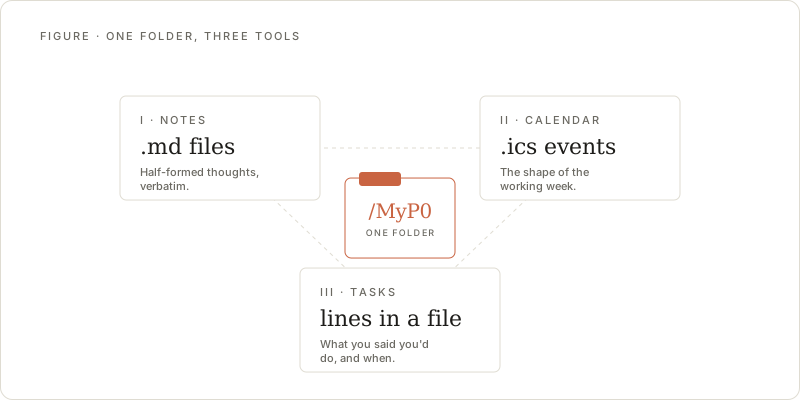
If you strip away every productivity framework, methodology, and app, you’re left with three fundamental questions:
- What do I know? (Notes)
- What do I need to do? (Tasks)
- When am I doing it? (Calendar)
Every productivity system ever invented is some combination of these three. GTD, PARA, time blocking, bullet journaling — they all organize information, actions, and time. Yet most tools treat these as entirely separate concerns. Your notes live in one app, your tasks in another, and your calendar in a third.
This separation creates friction that quietly erodes your productivity every single day.
The cost of context switching
When your notes, tasks, and calendar live in different tools, you become the integration layer. You’re the one who has to:
- Read through meeting notes to extract action items, then manually create tasks in a separate app
- Check your task list, then flip to your calendar to figure out when you’ll actually do the work
- Look at tomorrow’s calendar, then dig through notes to prepare for each meeting
Each switch between tools isn’t just a few seconds of alt-tabbing. It’s a context switch that breaks your mental model of what you’re working on and why. Research on cognitive switching penalties suggests that even brief interruptions can significantly impair your ability to resume complex thinking.
The real cost isn’t the 30 seconds you spend copying a task from your notes app to your task manager. It’s the mental overhead of maintaining three separate mental models that you constantly stitch together in your head.
How the three connect
Notes, tasks, and calendar aren’t just related — they form a cycle.
Notes generate tasks. You take notes in a meeting, during research, or while brainstorming. Buried in those notes are things you need to do. A note about a project discussion contains three follow-up items. A research note surfaces a bug that needs fixing. A brainstorm produces five ideas worth exploring.
Tasks need time. A task without a time allocation is a wish. When you decide to actually do something, you need to answer “when?” That means looking at your calendar, finding available time, and committing a block to the work. Without this step, tasks pile up indefinitely.
Calendar events produce notes. Every meeting, every focus block, every working session generates information. Meeting notes, decisions made during deep work, problems encountered while executing a task — these all feed back into your notes, which generate new tasks, which need time on the calendar.
This is the productivity triangle. Break any side of it, and the whole system degrades.
What breaks when they’re separated
Tasks without context
When tasks live apart from notes, they lose their “why.” A task that says “Update the API documentation” tells you what to do, but not which parts need updating, what changed, or where the relevant discussion happened. You end up spending the first 15 minutes of every task re-discovering the context you had when you created it.
Notes without actions
A notes app full of meeting minutes and research that never gets processed is just an archive. Information that doesn’t lead to action is trivia. When there’s no clear path from “I wrote this down” to “I need to do something about it,” notes become a graveyard of good intentions.
Calendar without connection
A calendar that only shows meetings and appointments tells you where you need to be, but not what you need to accomplish. You see a one-hour block for “Project Review” but have no link to the notes from last week’s review, the outstanding tasks, or the decisions that need to be made. You walk into meetings unprepared and walk out without capturing what matters.
The unified approach
The fix isn’t to build one monolithic app that does everything poorly. It’s to create meaningful connections between the three pillars so that information flows naturally.
From notes to tasks: When you write something down that requires action, it should be trivial to turn it into a task — ideally without leaving your note. The task should maintain a link back to the note that spawned it, preserving context.
From tasks to calendar: When you decide to work on a task, you should be able to see your available time and block it in one motion. The calendar event should know which task it’s serving.
From calendar to notes: When a meeting or work session ends, the notes you take should be connected to the calendar event and any related tasks. Next time you prepare for a similar meeting, everything is linked.
What this looks like in practice
Consider a typical Monday morning:
- You open your dashboard and see today’s calendar — three meetings and two focus blocks
- You tap on the 10am product sync. The app shows you notes from last week’s sync and three outstanding tasks from that meeting
- During the meeting, you take notes directly. When someone asks you to investigate a performance issue, you check a line in your notes and it becomes a task
- After the meeting, you look at your afternoon focus block. You see four available tasks ranked by priority. You pick the performance investigation and the calendar block updates to reflect what you’re actually working on
- While investigating, you write notes about what you find. These notes link back to the original task and the meeting where it was raised
No copying between apps. No hunting for context. No “what was I supposed to do again?”
Why MyP0 builds around this
This is the core idea behind MyP0. Not because unified productivity is a novel concept — people have been duct-taping their tools together for years — but because the implementation matters.
MyP0 uses Google Calendar, Google Tasks, and a block editor backed by Google Drive. These aren’t three separate tools bolted together. They share a single view, a single data layer, and a single interaction model.
- Your notes can contain task checkboxes that sync to Google Tasks
- Your tasks appear alongside your calendar so you can see what’s due and when you’re free
- Your calendar events link to notes and surface related tasks
And because everything lives in your Google account, there’s no new silo to worry about. Your data stays yours, and the connections between notes, tasks, and calendar happen naturally within tools you already use.
The principle
Productivity tools should reduce the friction between thinking, deciding, and doing. Notes capture thinking. Tasks capture decisions. Calendar captures doing. When these three flow into each other without friction, you spend less time managing your system and more time doing actual work.
The best productivity system is one you don’t think about. It just works because the connections are already there.